Accruent Meridian Enterprise 2025 Release Notes
We're delivering this upgrade on September 26, 2025, with the following highlights:
-
AutoCAD 2025 family support: Work with AutoCAD 2025 and all verticals.
-
Microsoft SQL Server 2022: Benefit from full compatibility with the latest supported version of Microsoft’s database platform.
-
Favorites ribbon: Access your most-used sections quickly with the new Favorites ribbon.
-
Group email notifications: Combine multiple PowerWeb notifications into a single email.
-
Recent documents: Access recent documents with one click to return to your work faster.
-
Assembly resolution: Resolve assembly components stored anywhere in the vault.
Meridian PowerUser end of life
Meridian Enterprise no longer includes the PowerUser client.
While you can still install the PowerUser client during the Meridian installation, it is no longer supported or maintained.
Meridian PowerWeb
Favorites ribbon
MPS-59385
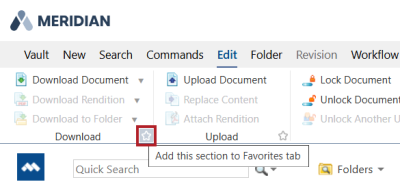
Quickly access your most-used sections with the new Favorites ribbon. Click the star icon in each section you want to include in the Favorites ribbon.
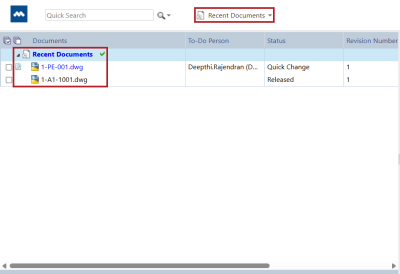
List of recently viewed documents
MPS-60963
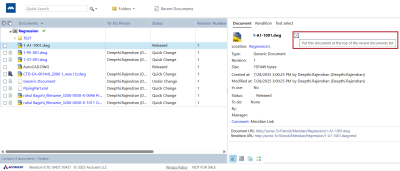
You can now access up to 30 documents in the Recent Documents navigation view, making it easier to return to your work. To add an item, click the clock icon next to the filename in the Document tab. To open the list, select Recent Documents in the navigation toolbar.
| Summary |
Reference # |
|---|---|
|
We've refreshed the look of the menu ribbon and property page tabs. |
MPS-60960 |
|
If you pin the ribbon, the system now retains your selected tab after a page refresh. |
MPS-61384 |
|
You can now hide status icons in document lists to reduce visual clutter. The icon appears when you hover over a row, allowing you to view the status only when needed. |
MPS-60961 |
|
When you unlock a drawing document in PowerWeb, Meridian now synchronizes the property from MicroStation based on the active sheet you selected and closed, rather than the last sheet in the document. |
MPS-57920 |
|
Meridian now sends email notifications as expected during workflow transitions. |
MPS-62137 |
|
The No such interface supported error no longer occurs when creating document collections or searching for documents in collections. |
MPS-61397 |
|
The Replace content and rendition command now works as expected when you drag a new drawing and PDF file over an existing document in PowerWeb. |
MPS-58986 |
|
When you edit the Memo field of a Word document in Meridian PowerWeb, the formatting now syncs with Microsoft Word. |
MPS-58777 |
|
Meridian PowerWeb no longer supports Edge in IE mode following the interface modernization. |
MPS-61498 |
Meridian Portal
| Summary |
Reference # |
|---|---|
|
You can now edit the package export path used for creating packages in Meridian Portal. The package export path might exceed the 255 characters path length limit and cause package export failures. |
MPS-57955 |
Application Integration
| Summary |
Reference # |
|---|---|
|
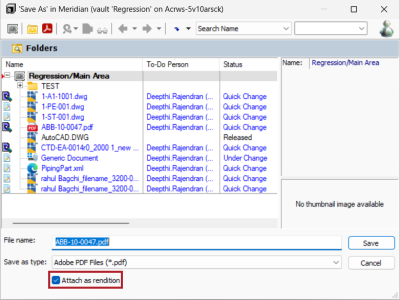
When saving a document in a Meridian vault using Application Integration in remote or online mode, you can now attach a rendition from the Save as dialog, instead of replacing the native document content. To do this, first save the rendition to your local workspace (LWS). In the Save as dialog, select Attach as rendition.
|
MPS-59694
|
|
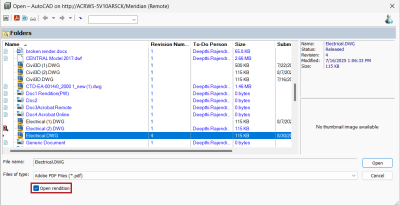
You can now open renditions instead of the native document content from the Open dialog in To do this, ensure the rendition is synchronized to your local workspace (LWS). In the Open dialog, select Open rendition. This option is disabled if the document is already a PDF.
|
MPS-59438 MPS-57358 |
|
You can now set the Folder view as the default in Application Integration. To do this, add the RevertToRoot registry key. |
MPS-60986 |
|
The Connect to PowerWeb button now works as expected when you open a document in Application Integration. |
MPS-59640 |
Application Links
AutoCAD Family 2025 Support
MPS-55021, MPS-55020, MPS-55026, MPS-55017
Meridian now integrates with AutoCAD 2025, and AutoCAD based applications such as Electrical, Map 3D, Civil 3D, and RealDWG 2025.
Asset Management in Plant 3D is not yet supported in Meridian 2025.
Improvements and issues fixed
| Summary |
Reference # |
|---|---|
|
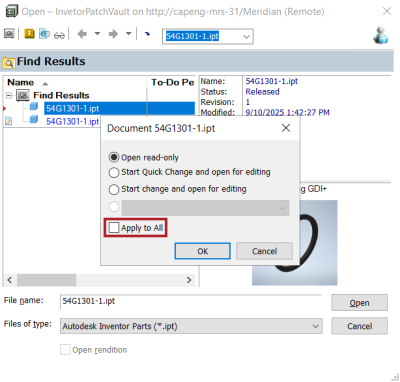
When you open an assembly in Inventor, you can now select a workflow state and apply it to all files in the assembly, saving time and ensuring consistency. To do this, select the Apply to all checkbox.
|
MPS-60327 |
|
When you open an assembly from Meridian PowerWeb, Inventor now automatically searches the vault to find and resolve missing component files. Find more information about this feature |
MPS-57903 |
Meridian Administration
Microsoft SQL Server 2022
MPS-54869
Meridian now supports Microsoft SQL Server 2022, ensuring compatibility with the latest enterprise database standards.
Improvements and issues fixed
|
Component |
Summary |
Reference # |
|---|---|---|
|
Import Profile |
You can now import new file system documents without receiving an error when Meridian scans the package using Import Profile. |
MPS-61090 |
|
Licenses |
Configure Meridian Explorer to claim licenses using only the Windows account name, without the domain. This prevents duplicate license consumption when users have different Enterprise Server usernames and Windows account names. To do this, set the C:\ProgramData\BlueCieloECM\Hyperion\ ExplorerLicensingConfig.dat |
MPS-61426 |
|
Meridian Administrator |
Combine multiple PowerWeb notifications into a single email during each transmission interval. This improves reliability when many notifications are generated in a short period and helps users stay on top of updates in one centralized message. |
MPS-58326 |
|
Meridian Configurator |
You can now recalculate extents when extracting hotspots. This ensures that hotspots display in the correct position after updates. Add the RecalculateExtentsOnHotspotExtraction settings with one of the following values in the AutoCAD Application Link Settings in Meridian Configurator:
|
MPS-61196 |
|
Publisher |
Meridian now supports AutoCAD 2025 in the Publisher AutoCAD rendering module. |
MPS-55019 |
|
Registry Keys |
The following registry key settings are outdated and no longer affect your environment:
If they exist on your server, you can remove them from: HKEY_LOCAL_MACHINE\Software\Cyco\AutoManager Meridian\CurrentVersion\WebLink. |
MPS-61104 |
|
Registry Keys |
You can now set the UseNetworkLogon registry key to use the Network logon type. This allows you to remove Meridian users from the Allow Log on Locally group policy. |
MPS-61253 |
|
Registry Keys |
Set the UseViewerWebApp registry key if you need compatibility with Microsoft Edge Internet Explorer (IE) mode or if you use hotspots in Meridian 2025. |
MPS-60656 |
|
Registry Keys |
We’ve set a default limit of 10,000 documents when generating reports, if the ReportDocumentsLimit registry value is not defined. This helps prevent performance issues in PowerWeb when running large reports. |
MPS-58140 |
|
Registry Keys |
Improve performance when you edit and save assemblies in Autodesk Inventor. Add the |
MPS-61719 |
|
Viewer |
By default, Apryse (formerly PDFTron) downloads fonts from the internet. If your environment restricts internet access due to firewall rules or security policies, you can now configure Meridian to use fonts from a local folder instead. . |
MPS-61460 MPS-60967 MPS-60435 |
|
Viewer |
We no longer support Autovue and Forge. We've removed all related configuration. |
MPS-61011 |
|
Viewer |
Meridian now uses Apryse (formerly PDFTron) version 10. This requires the installation of the URL Rewrite module on web servers that host Meridian or Explorer. |
MPS-57797 |
|
Viewer |
Text search is no longer available in the viewer when comparing documents or revisions. |
MPS-63116 |
