This article describes a sample configuration and use case that implements the option to synchronize Local Workspace on a Project Workflow transition introduced in Meridian 2020 R2.
Use case
Meridian Projects are used as a ‘binder’ to send a group of documents through a workflow. As the Project goes through its workflow, the workflow status of the documents is linked to the Project Workflow status:
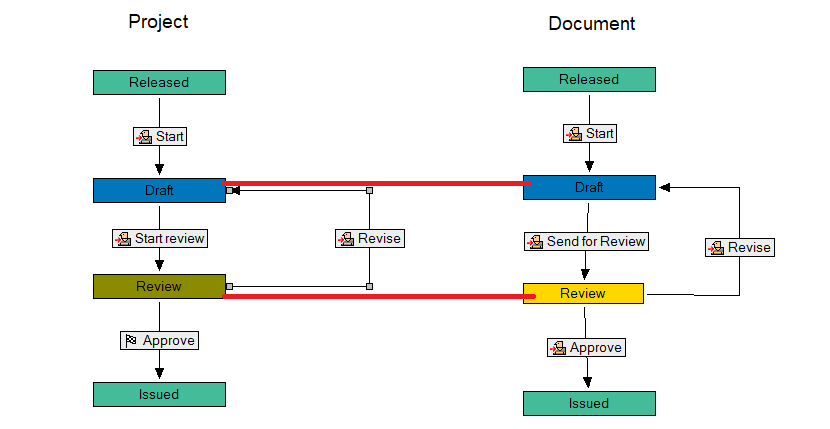
Implement the sample configuration
You can download Project Workflow.zip, which contains a .met file with a sample implementation you can use.
You can import the .met file to an empty vault. No external components are required.
Create a new document
When you create a new document in a project, the project name is recorded in a property so that it can easily be found in script when processing a Project Workflow Transition.
Sub DocGenericEvent_AfterNewDocument(Batch, Action, SourceFile, DocType, DocTemplate)
    If Not Document.ParentProject Is Nothing Then
        Document.Project_ProjectName = Document.ParentProject.Name
        Document.ApplyPropertyValues
    End If
End Sub
Synchronize LWS content on a Project Workflow Transition
The new option to synchronize and unlock all projects documents on a Project Workflow Transition is selected for transitions Start review and Revise:
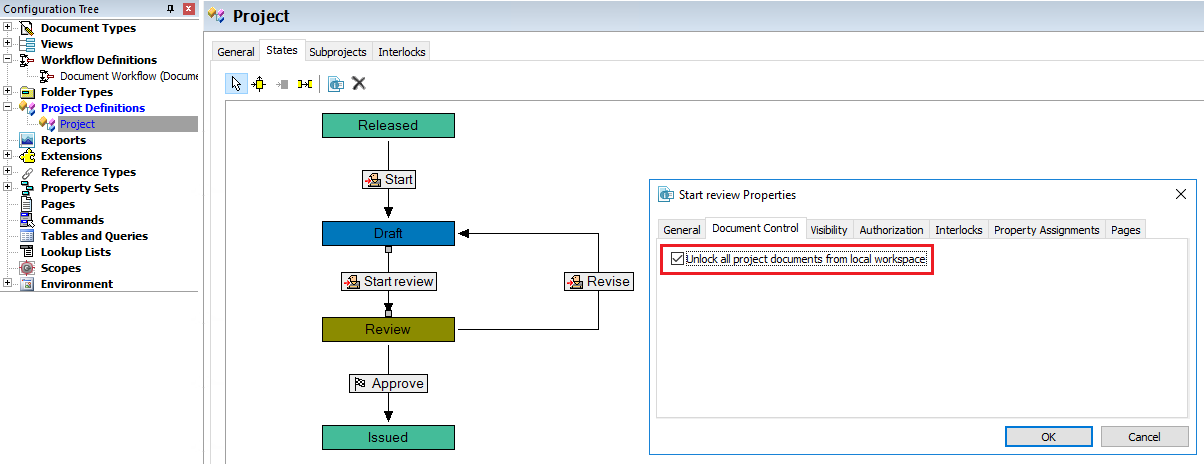
Execute a project workflow transition
On the project workflow transition, all documents in the projects are collected using FindDocuments, and then processed one by one to set the desired document workflow state.
Sub ProjectWorkflowEvent_AfterExecuteTransition(Batch, Transition, Manager, Comment)
    Dim DocSoureState, DocTransition

    Select Case Transition.TargetState.Name
        Case "Draft"
            DocSoureState = "Review"
            DocTransition = "Revise"
        Case "Review"
               DocSoureState = "Draft"
            DocTransition = "SendforReview"
    End Select

    Dim ProjectDocs : Set ProjectDocs = Vault.FindDocuments (, , Array ("Project.ProjectName", IC_OP_EQUALS, Folder.Name))

    Dim i
    For i = 0 To ProjectDocs.Count - 1
           If (ProjectDocs.Document (i).WorkFlowState And AS_WF_CDWF) <> 0 Then
              If ProjectDocs.Document (i).CWFState.Name = DocSoureState Then
                   ProjectDocs.Document (i).ExecTransition DocTransition
                   ProjectDocs.Document (i).ApplyPropertyValues
            End If
        End If
    Next
End Sub